My Experience with the BKHD C246 ITX NAS Motherboard from Aliexpress, for Coffee-Lake CPUs and ECC Memory
2025-12-12
This is the first post on my blog!
In this post I will share my experiences and knowledge about this motherboard, as before purchasing I found it very hard to find info on it.
Why buy a Coffee Lake (2018) system in 2025?
My use for a home server consists of the typical serving of media such as movies, using it as a personal cloud for files and images, as well as the occasional homelab experiment (running scripts, downloading terabytes of public domain PDFs, etc.).
This requires not much compute power, but if you want to run error-correction memory (ECC) and integrated graphics (for transcoding of media), your options these days are limited. Intel stopped supporting ECC for i3 CPUs from the 10th generation. Apart from that, any Intel motherboard of the recent generations that supports ECC will set you back multiple hundreds of €. AMD has a very compelling line of Ryzen PRO CPUs, which are very fast for the money, but they are somewhat hard to get and have become expensive recently. Most consumer AMD motherboards support UDIMM ECC, though.
Ultimately, many people still rely on Intel chips of the 9th generation or before. They are power-efficient, cheap and good for the job. However, finding a motherboard that supports ECC memory is a challenge. You need one with a server chipset such as C242 or C246. These boards can be had on the used market, but prices vary from 100€-400€ for what are often ATX boards (that draw more power than smaller ITX boards).
With used 9th gen. Intel chips, including Xeon, being available easily, there is a market for C242/C246 motherboards. Chinese manufacturer BKHD has taken this opportunity and released an C246 ITX NAS Motherboard, specifically aimed at the Homelab/NAS market. Costing a little over 100€, this board is competing with the used market, offering name brands like Micro Center. But with its homelab-specific features, like the 2x M.2 (NVMe PCIe 3.0) and 8 SATA ports, it seems like a good choice.
Together with a 4C/8T Xeon E-2174G I got for <50€ from ebay and some used Unregistered DDR4 RAM I was looking to build a fairly cheap and efficient system.
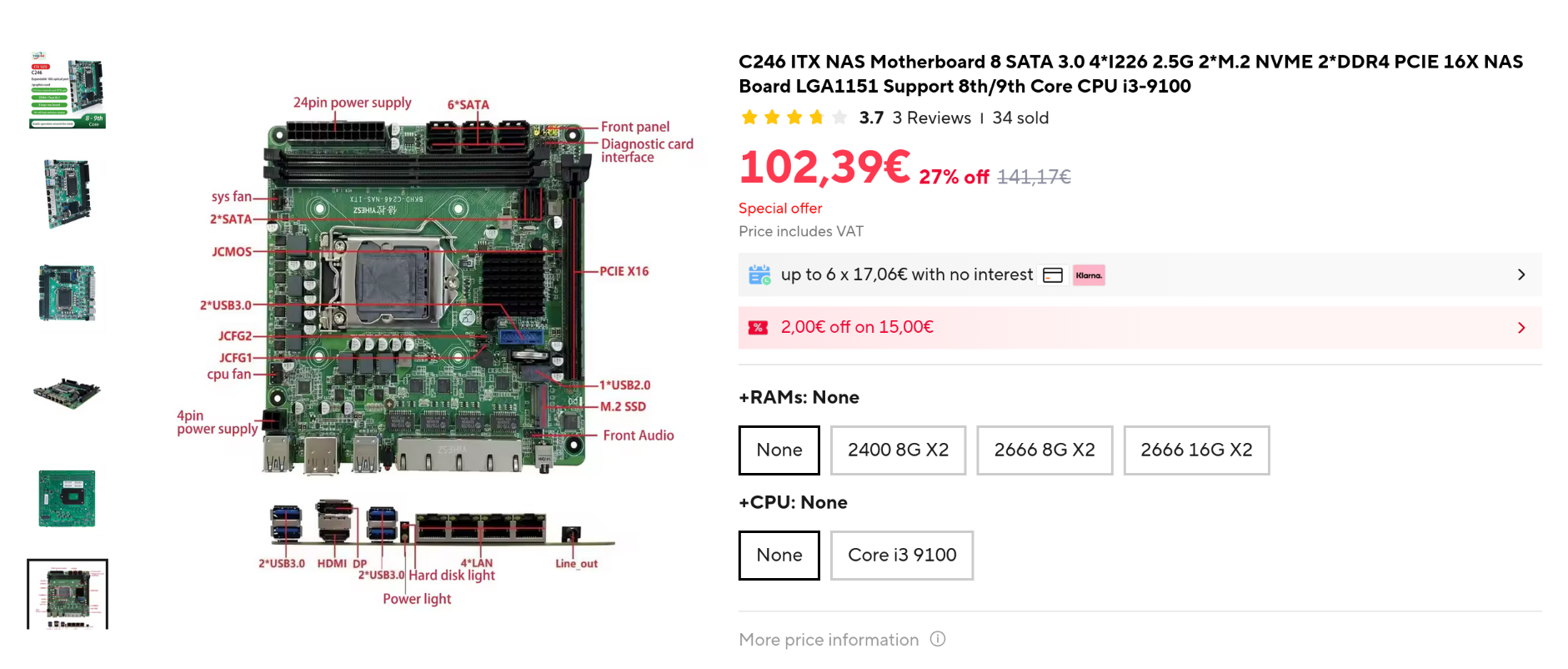
Ambiguous specs
Memory
Finding any info on the board is kind of hard. The product description states that it "does not support server memory", but supports "pure ECC memory" and "ordinary memory". This refers to the difference between registered (RDIMM) and unregistered (UDIMM) ECC memory, which are physically distinct. UDIMM uses the same lane layout as regular DIMM sticks. This board supports regular DIMMs and UDIMMs.
CPU support
The page also only advertised support for i3/i5/i7 chips, not mentioning Xeon. I have confirmed it to work with my Xeon.
Power consumption
One of the reasons for me to get this ITX board over a used MicroCenter ATX board was power efficiency (larger board -> more power). Strangely, the manufacturer claims the following: "Standby power 39W/ Full load power: 196W". This seems like someone built a random system and tested it, as there is no way the board alone uses so much power. So I disregarded the claim and later proved to build a much more efficient system.
Experiences with the board
PSU Compatibility issues
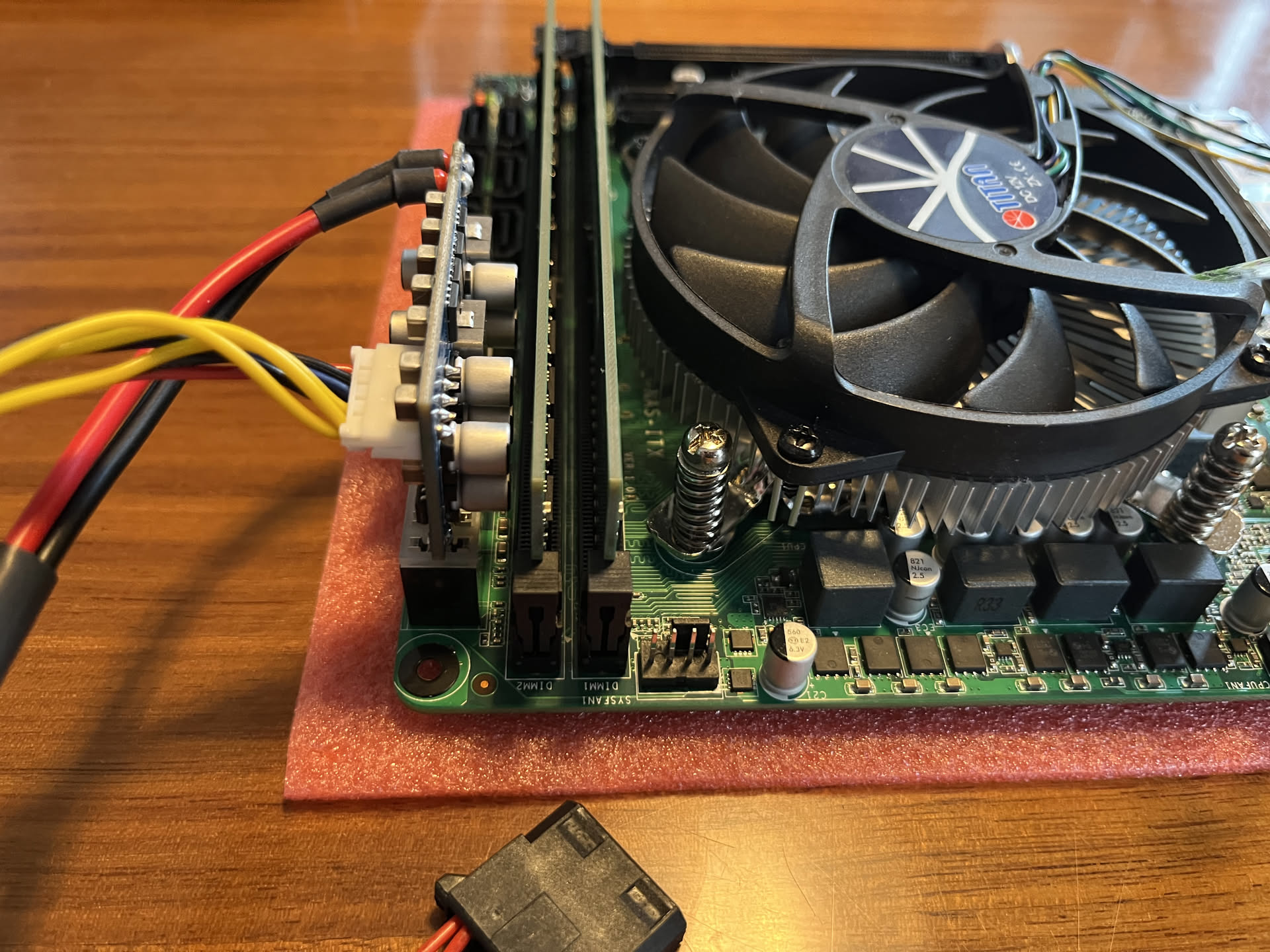
The first issue was compatibility with my cheap Inter-Tech (picoPSU-like) power supply. This is a small board that replaces an ATX PSU and directly plugs into the 20/24 Pin slot of the motherboard. It has power coming in from a 12V DC power brick and delivers power to the rest of the system, such as SATA devices.
And its connectors block the RAM slot. I was able to fit one RAM stick to test if the system boots, at least. It did!
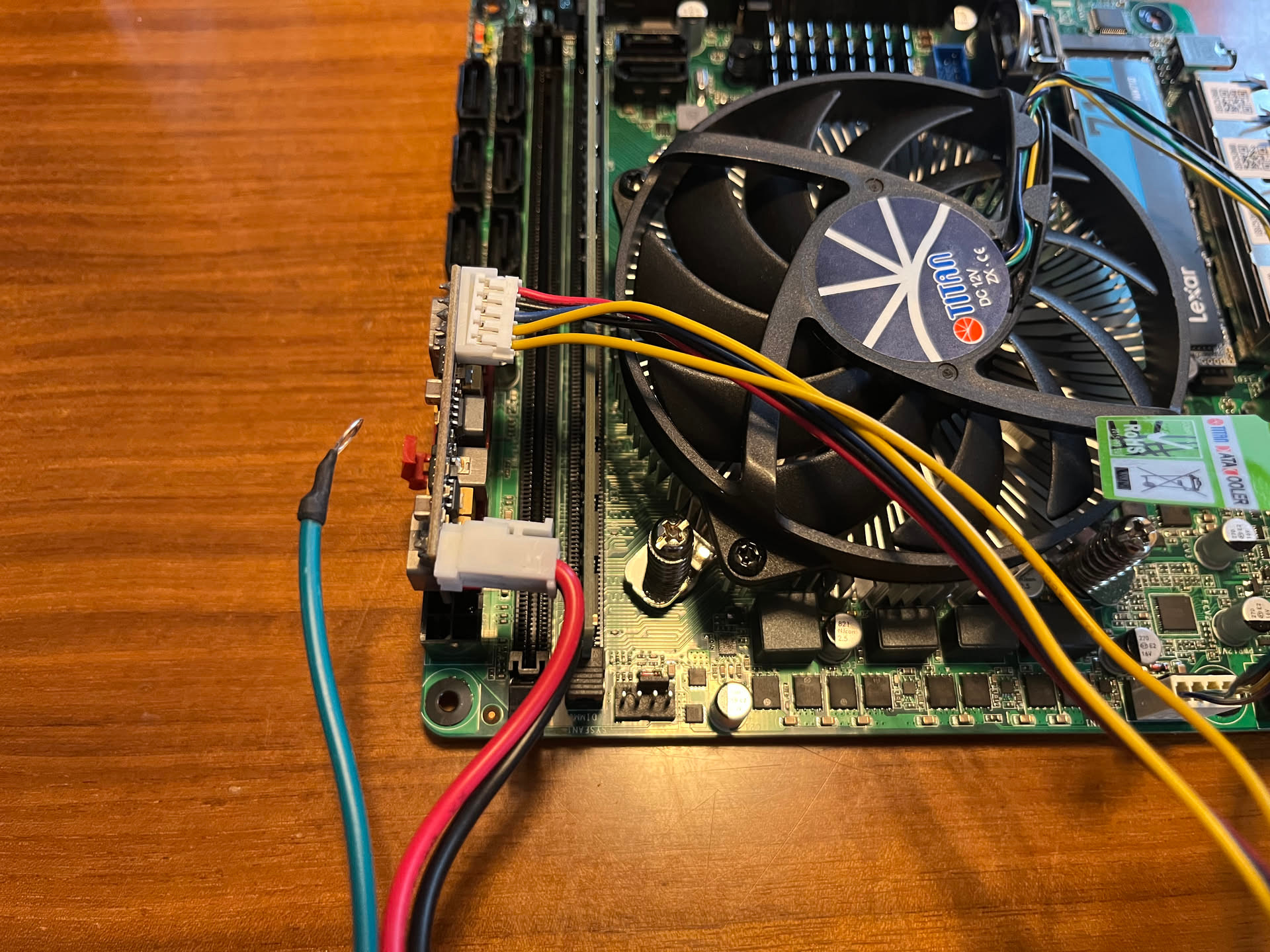 By buying a new and higher capacity mini PSU I solved the issue.
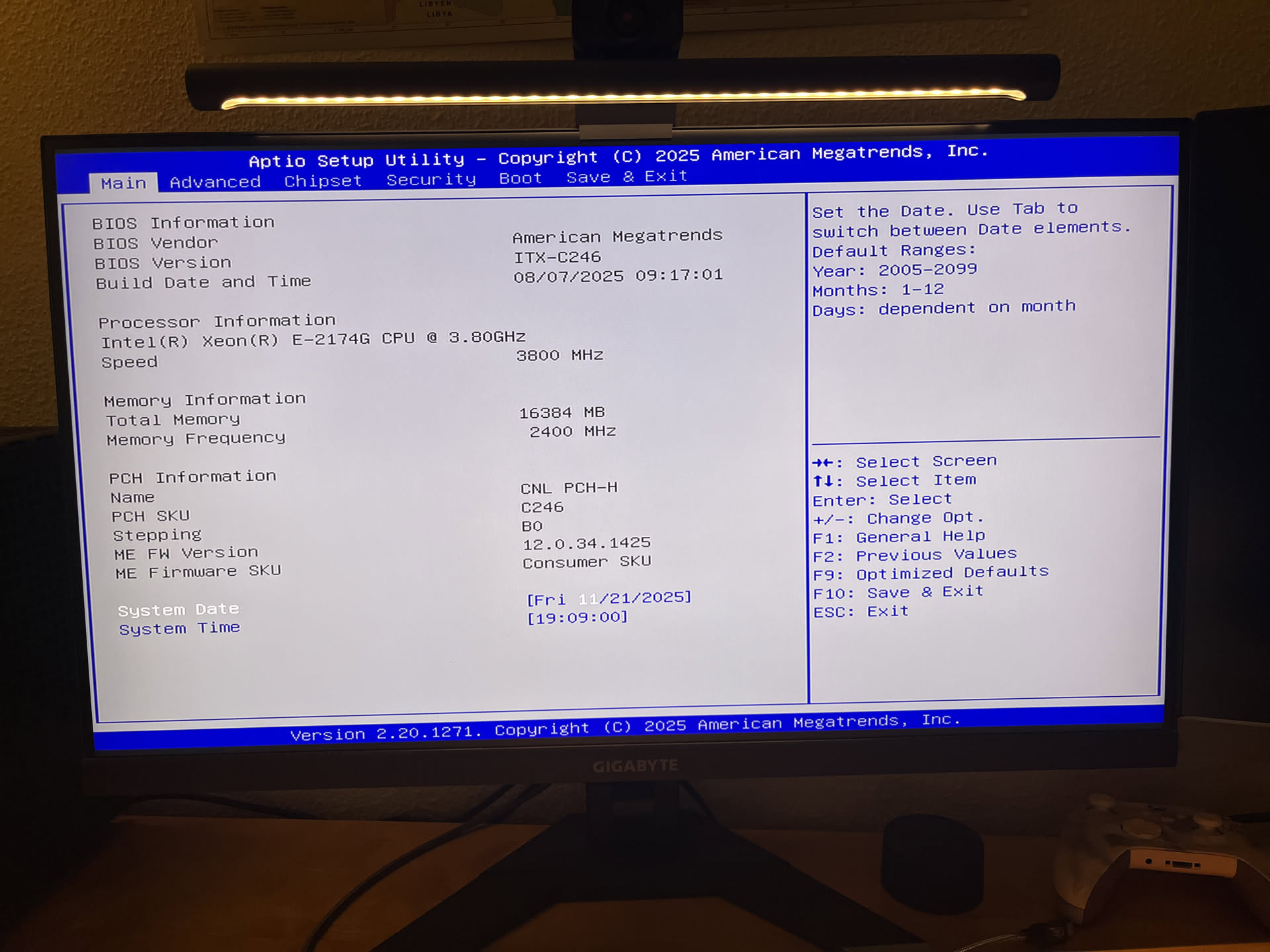
UEFI BIOS
I was expecting the Firmware of the motherboard to be its weakest point, as with most sketchy aliexpress stuff. It turns out to be very basic, but it implements almost all features I was hoping for.
ASPM / C-State support
ASPM is necessary for PCIe devices to go into a low power state. This in turn enables the CPU package to enter a lower power state (C-State). I was happy to see this board support ASPM and give the user some options for it. The two M.2 drives I am using are able to enter a state where Unraid reports them using as little as 0.01W per drive. The default C-State options are also accessible. Don't expect this board to reach low C-States, though.
Power consumption
Without the ability to read any reviews beforehand, power consumption was a gamble with this board. The system is definitely more power hungry than the J5005 (with 8G RAM) I was running before, but the measurements I took are not too bad. For context:
- Intel Xeon E-2174G (4C/8T)
- 16GB 2400MHz ECC UDIMM
- 2x 5400rpm SATA 8TB (Western Digital)
- 2x Lexar NM710 PCIe/NVMe 2TB
- 1x Ethernet port connected.
- 1 CPU fan + 1 system fan
Powertop shows the following idle stats:
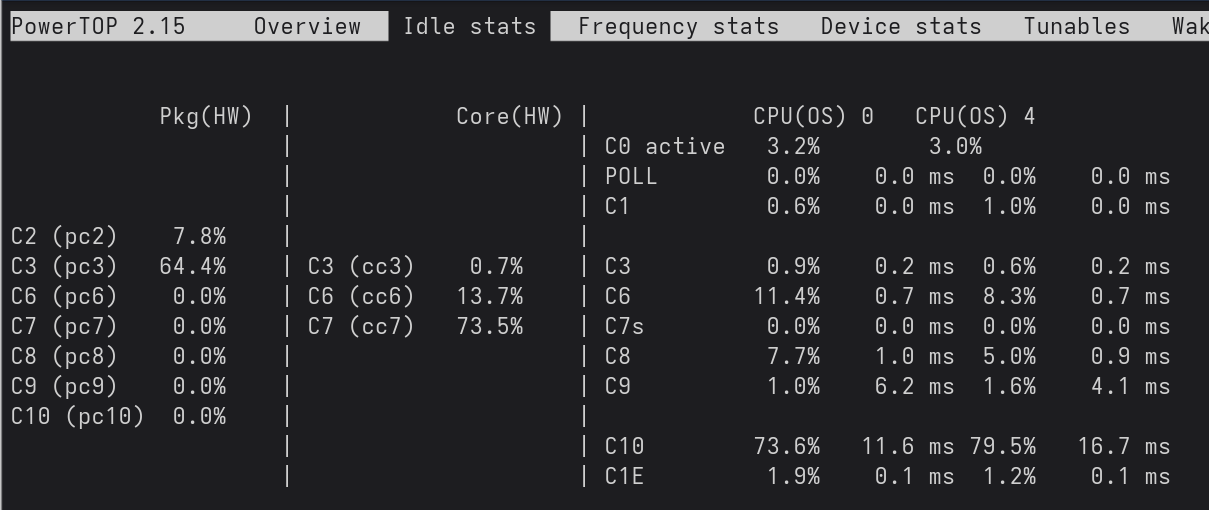
We can see that the package does not go below C3, sadly.
Using a powermeter for measuring the whole system, it appears to go down to 11W at idle (with HDDs spun down). While it does not constantly stay at this level, but jumps up to 20W or 30W every 10 seconds or so, this is quite a good result (Edit: Since writing this post, I purchased a newer smart power meter, which reports 12-14W at idle). After all, the CPU ranges from 800Mhz to 4.7 Ghz, so big jumps make sense. Doing actual work on the HDDs can have the system go into the 50-70W range.
With the HDDs spinning down, SSDs and NICs entering a low power state and the CPU cores reaching C7, this suggests there is either another device that prevents the package from going below C3 – or a poorly implemented UEFI. Using lspci -vv, I can see that the PCIe x16 slot does not have ASPM enabled:
PCI bridge: Intel Corporation 6th-10th Gen Core Processor PCIe Controller (x16) (rev 07) (prog-if 00 [Normal decode])
		LnkCtl:	ASPM Disabled; RCB 64 bytes, LnkDisable- CommClk-
Going back into the UEFI BIOS I did not find any more options to turn off the PCIe Link or enable ASPM. The PCIe lanes connected to the chipset have some options, but the x16 directly going into the cpu has limited configuration. Also, adding pcie_aspm=force to the boot options did not help.
Conclusion:
So far, this board has been running just fine. With ASPM and SATA link power management enabled, the basic power saving features are provided. With a board from a reputable manufacturer you might save 1-3W at idle, but you would also have to use expansion cards for 2.5G networking and NVMe slots. I would recommend this board, if you can get a Coffee Lake CPU for cheap money and want to run ECC. If you are lucky to get a brand board for a similar price that fits your needs, get that.
If you have any corrections, questions or want to share your experiences, write me an email. You get the adress if you click "Impressum" at the bottom of the page.
Over and out :-)
Maxju